![CloudNine_Transparent_Low Res.png]](https://kb.cloudnine.com/hs-fs/hubfs/1%20-%20CloudNine%20MARKETING/1%20-%20LOGOS/CloudNine%20Logos/CloudNine_Transparent_Low%20Res.png?height=40&name=CloudNine_Transparent_Low%20Res.png)
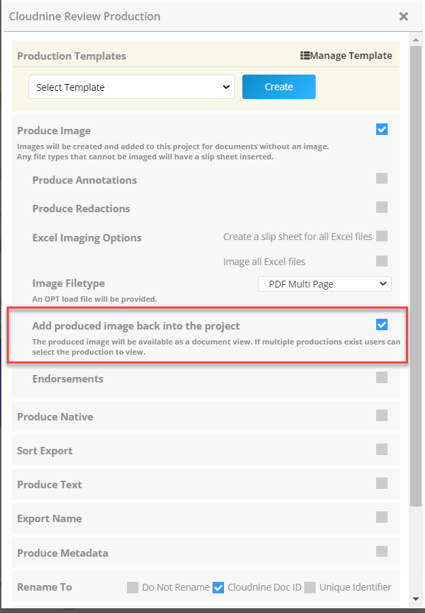
A copy of the produced image can be saved back into the project. The option is available on the CloudNine Review Production screen (Tools-Self Service Production) and is selected by default.
When you choose to add produced images back into the project, a new Produced tab appears within the document viewing frame.

If a record is produced multiple times, you can have multiple versions of produced images. The Produced image tab defaults to the most recent production, use the drop-down to view images from other productions.
Adding Produced images back to the project will result in additional hosting fees.