---
title: "CloudNine Review: What is the difference between Organization and Project-level Access?"
description: "CloudNine Review has two different access level options: Organization Access Level and Project Access Level"
---
[Skip to content](https://kb.cloudnine.com/cloudnine-review-what-are#main-content)
English
Show submenu for translations
[Contact us](https://kb.cloudnine.com/kb-tickets/new?hsLang=en)

Open main navigation
Close main navigation
- English
Show submenu for translations
- [Contact us](https://kb.cloudnine.com/kb-tickets/new)
- [Go to cloudnine.com](https://cloudnine.com/)
[Go to cloudnine.com](https://cloudnine.com/)
Hello. How can we help you?
- There are no suggestions because the search field is empty.
1. [Help Center](https://kb.cloudnine.com/?hsLang=en)
2. [CloudNine Review](https://kb.cloudnine.com/cloudnine-review?hsLang=en)
3. [Section 5: Administrative Functions](https://kb.cloudnine.com/cloudnine-review?hsLang=en#section-5-administrative-functions)
# CloudNine Review: What is the difference between Organization and Project-level Access?
## CloudNine Review has two different access level options: Organization Access Level and Project Access Level
This article describes the difference between Organization and Project-Level Access in CloudNine Review.
### **Organization-Level Access**
Provides access to CloudNine Review projects that are a part of an organization. There are three access options within an organization: **Admin**, **User**, and **Reviewer**.
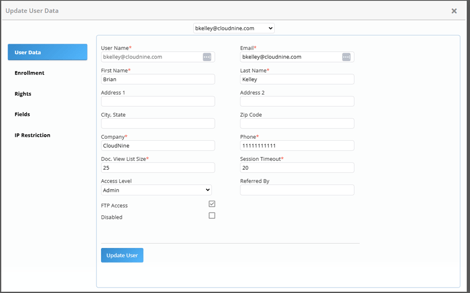
**Admin:** As an Admin to an organization, you have access to all projects and users assigned within your organization. Organization-level Admins have access to:
- Update user information, timeout settings, IP address restrictions, and enable/disable user access.
- Update user enrollments, rights, and field options.
- Update project enrollment and rights for all projects assigned to the organization.
- View organization reports, including billing, enrolled users, last access dates, and audit history, for all projects within the organization.
- Access to view the Organization Discovery Queue, which displays all active and prior processes (last 30 days). Processes include: import, export, imaging, and bulk redaction workflows.
**User:** With user-level access to an organization, users can:
- Create new projects for the organization.
- Organization Admins can enroll users to new and existing projects, with the default user-level for the project.
- User access is the default when created via the invitation system.
**Reviewer:** Limited access at the organization and project level.
- By default, users enrolled in a project are assigned the Reviewer access level.
- This access level is generally not recommended, as it restricts users from utilizing key project functionalities, including search capabilities.
### Project-Level Access
Project-level access is specific to each project and contains one of three access level options: Admin, User, and Reviewer. At the project-level, it is possible to be an Admin on one project, a User on another project, and a Reviewer in yet another project, regardless of the organizational rights assigned.
When a user creates a new project in CloudNine Review, they are automatically an Admin for that project.
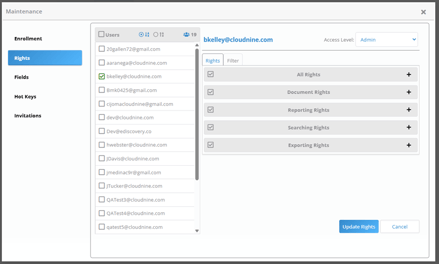
**Admin:** Project-level Admins have access to the following functions:
- Update user enrollment, rights, and field options for the specific project.
- Upload new data into the project.
- Apply project and user-level filters to the project.
- Run reports for the project.
**User:** Specified rights are assigned to the user for that project. Rights can be updated by Project or Organization Admins.
- A user cannot upload new data
**Reviewer:** Reviewers have limited access to a project.
- If available in the project, a Reviewer can only access Review sets.
- When a review set does not exist, a Reviewer will access to the project but without search capabilities.
- [CloudNine Training Videos](https://kb.cloudnine.com/cloudnine-training-videos?hsLang=en#main-content)
- [CloudNine Videos by Product](https://kb.cloudnine.com/cloudnine-training-videos?hsLang=en#cloudnine-videos-by-product)
- [CloudNine Review](https://kb.cloudnine.com/cloudnine-review?hsLang=en#main-content)
- [CloudNine Review Video Library](https://kb.cloudnine.com/cloudnine-review?hsLang=en#cloudnine-review-video-library)
- [Section 1: Getting Started](https://kb.cloudnine.com/cloudnine-review?hsLang=en#section-1-getting-started)
- [Getting Started: My Projects](https://kb.cloudnine.com/cloudnine-review?hsLang=en#getting-started-my-projects)
- [Section 2: Understanding Different Views](https://kb.cloudnine.com/cloudnine-review?hsLang=en#section-2-understanding-different-views)
- [Section 3: Searching](https://kb.cloudnine.com/cloudnine-review?hsLang=en#section-3-searching)
- [Section 3A. Smart Filters](https://kb.cloudnine.com/cloudnine-review?hsLang=en#section-3a-smart-filters)
- [3b: Search Term Lists](https://kb.cloudnine.com/cloudnine-review?hsLang=en#3b-search-term-lists)
- [Section 4: Working with Documents](https://kb.cloudnine.com/cloudnine-review?hsLang=en#section-4-working-with-documents)
- [Generating Images](https://kb.cloudnine.com/cloudnine-review?hsLang=en#generating-images)
- [Automated Redaction](https://kb.cloudnine.com/cloudnine-review?hsLang=en#automated-redaction)
- [Exporting/Producing](https://kb.cloudnine.com/cloudnine-review?hsLang=en#exporting-producing)
- [Section 5: Administrative Functions](https://kb.cloudnine.com/cloudnine-review?hsLang=en#section-5-administrative-functions)
- [Reporting](https://kb.cloudnine.com/cloudnine-review?hsLang=en#reporting)
- [Frequently Asked Questions and Issues](https://kb.cloudnine.com/cloudnine-review?hsLang=en#frequently-asked-questions-and-issues)
- [Cloud Connector](https://kb.cloudnine.com/cloudnine-review?hsLang=en#cloud-connector)
- [EULA](https://kb.cloudnine.com/cloudnine-review?hsLang=en#eula)
- [CloudNine Discovery Portal](https://kb.cloudnine.com/cloudnine-discovery-portal?hsLang=en#main-content)
- [CloudNine Discovery Portal Video Library](https://kb.cloudnine.com/cloudnine-discovery-portal?hsLang=en#cloudnine-discovery-portal-video-library)
- [Getting Started](https://kb.cloudnine.com/cloudnine-discovery-portal?hsLang=en#getting-started)
- [File System Workflows](https://kb.cloudnine.com/cloudnine-discovery-portal?hsLang=en#file-system-workflows)
- [Data Transfer Workflows](https://kb.cloudnine.com/cloudnine-discovery-portal?hsLang=en#data-transfer-workflows)
- [LAW Bridge](https://kb.cloudnine.com/cloudnine-discovery-portal?hsLang=en#law-bridge)
- [Global Monitoring Console](https://kb.cloudnine.com/cloudnine-discovery-portal?hsLang=en#global-monitoring-console)
- [Advanced Features & Troubleshooting](https://kb.cloudnine.com/cloudnine-discovery-portal?hsLang=en#advanced-features-troubleshooting)
- [LAW](https://kb.cloudnine.com/law?hsLang=en#main-content)
- [CloudNine LAW Video Library](https://kb.cloudnine.com/law?hsLang=en#cloudnine-law-video-library)
- [CloudNine LAW: Did You Know?](https://kb.cloudnine.com/law?hsLang=en#cloudnine-law-did-you-know)
- [Installation and Setup](https://kb.cloudnine.com/law?hsLang=en#installation-and-setup)
- [Print Queue Management](https://kb.cloudnine.com/law?hsLang=en#print-queue-management)
- [Turbo Import](https://kb.cloudnine.com/law?hsLang=en#turbo-import)
- [ED Loader](https://kb.cloudnine.com/law?hsLang=en#ed-loader)
- [Errors](https://kb.cloudnine.com/law?hsLang=en#errors)
- [Email](https://kb.cloudnine.com/law?hsLang=en#email)
- [Endorse](https://kb.cloudnine.com/law?hsLang=en#endorse)
- [Document Numbering](https://kb.cloudnine.com/law?hsLang=en#document-numbering)
- [Annotations](https://kb.cloudnine.com/law?hsLang=en#annotations)
- [Image Conversion](https://kb.cloudnine.com/law?hsLang=en#image-conversion)
- [Near Dupe](https://kb.cloudnine.com/law?hsLang=en#near-dupe)
- [SQL](https://kb.cloudnine.com/law?hsLang=en#sql)
- [Batch Printing HTML](https://kb.cloudnine.com/law?hsLang=en#batch-printing-html)
- [DataSent](https://kb.cloudnine.com/law?hsLang=en#datasent)
- [Filter and Search](https://kb.cloudnine.com/law?hsLang=en#filter-and-search)
- [Administration](https://kb.cloudnine.com/law?hsLang=en#administration)
- [Explore](https://kb.cloudnine.com/explore?hsLang=en#main-content)
- [CloudNine Explore Video Library](https://kb.cloudnine.com/explore?hsLang=en#cloudnine-explore-video-library)
- [Managing Cases](https://kb.cloudnine.com/explore?hsLang=en#managing-cases)
- [Importing](https://kb.cloudnine.com/explore?hsLang=en#importing)
- [Searching](https://kb.cloudnine.com/explore?hsLang=en#searching)
- [Exporting](https://kb.cloudnine.com/explore?hsLang=en#exporting)
- [Concordance](https://kb.cloudnine.com/concordance?hsLang=en#main-content)
- [Searching](https://kb.cloudnine.com/concordance?hsLang=en#searching)
- [eDocs](https://kb.cloudnine.com/concordance?hsLang=en#edocs)
- [Email](https://kb.cloudnine.com/concordance?hsLang=en#email)
- [Other](https://kb.cloudnine.com/concordance?hsLang=en#other)
- [Exporting](https://kb.cloudnine.com/concordance?hsLang=en#exporting)
- [Proof of Concept](https://kb.cloudnine.com/concordance?hsLang=en#proof-of-concept)
- [Concordance Desktop](https://kb.cloudnine.com/concordance-desktop?hsLang=en#main-content)
- [Email Database](https://kb.cloudnine.com/concordance-desktop?hsLang=en#email-database)
- [CloudNine Analyst](https://kb.cloudnine.com/cloudnine-analyst?hsLang=en#main-content)
- [CloudNine Analyst Video Library](https://kb.cloudnine.com/cloudnine-analyst?hsLang=en#cloudnine-analyst-video-library)
- [FAQ](https://kb.cloudnine.com/cloudnine-analyst?hsLang=en#faq)
- [Known Issues and Behavior](https://kb.cloudnine.com/cloudnine-analyst?hsLang=en#known-issues-and-behavior)
- [Account](https://kb.cloudnine.com/cloudnine-analyst?hsLang=en#account)
- [Projects](https://kb.cloudnine.com/cloudnine-analyst?hsLang=en#projects)
- [Import](https://kb.cloudnine.com/cloudnine-analyst?hsLang=en#import)
- [Export](https://kb.cloudnine.com/cloudnine-analyst?hsLang=en#export)
- [Machine Translation](https://kb.cloudnine.com/cloudnine-analyst?hsLang=en#machine-translation)
- [Reports](https://kb.cloudnine.com/cloudnine-analyst?hsLang=en#reports)
- [Investigations](https://kb.cloudnine.com/cloudnine-analyst?hsLang=en#investigations)
- [ESIA Desktop](https://kb.cloudnine.com/cloudnine-analyst?hsLang=en#esia-desktop)
- [ESIA Sync](https://kb.cloudnine.com/cloudnine-analyst?hsLang=en#esia-sync)
- [Administration](https://kb.cloudnine.com/cloudnine-analyst?hsLang=en#administration)
- [On Premise Software Q&A](https://kb.cloudnine.com/on-premise-software-qa?hsLang=en#main-content)
- [On Premise Software](https://kb.cloudnine.com/on-premise-software-qa?hsLang=en#on-premise-software)
- [EULA](https://kb.cloudnine.com/on-premise-software-qa?hsLang=en#eula)
[](http://www.cloudnine.com)
12848 Queensbury Lane, Suite 208 | Houston, TX 77024 | 713-999-4280 | [info@cloudnine.com](mailto:info@cloudnine.com)
Copyright © 2026, CloudNine