---
title: "CloudNine Review: Is it possible to hide empty System Fields?"
description: Hide Empty System Fields
---
[Skip to content](https://kb.cloudnine.com/cloudnine-review-is-it-possible-to-hide-empty-system-fields#main-content)
English
Show submenu for translations
[Contact us](https://kb.cloudnine.com/kb-tickets/new?hsLang=en)

Open main navigation
Close main navigation
- English
Show submenu for translations
- [Contact us](https://kb.cloudnine.com/kb-tickets/new)
- [Go to cloudnine.com](https://cloudnine.com/)
[Go to cloudnine.com](https://cloudnine.com/)
Hello. How can we help you?
- There are no suggestions because the search field is empty.
1. [Help Center](https://kb.cloudnine.com/?hsLang=en)
2. [CloudNine Review](https://kb.cloudnine.com/cloudnine-review?hsLang=en)
3. [Section 2: Understanding Different Views](https://kb.cloudnine.com/cloudnine-review?hsLang=en#section-2-understanding-different-views)
# CloudNine Review: Is it possible to hide empty System Fields?
## Empty System Fields can be Hidden on the Vertical Doc List and Native Tree View
### **Toggle Empty System Fields Visibility**
The **Toggle empty system fields visibility** option is available on the Vertical Doc List and Native Tree Views and can be used to hide/show empty system fields.
By default, all system fields are visible and indicated with the open eye icon at the top left corner of the System Fields window.
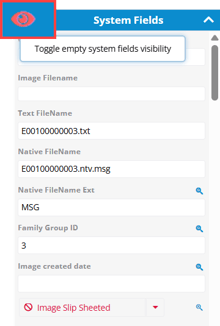
To hide empty system fields, click the eye icon at the top left of the System Fields pane. When system fields are hidden, a line appears through the eye icon.
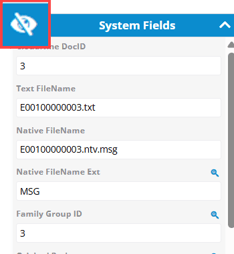
When you hide system fields, only populated fields are displayed in the System Fields pane for that record.
🗒️**Note:** The default setting shows all System Fields. When Hide Empty System Fields is selected, empty system fields remain hidden until the option is toggled to show all System Fields. This setting affects all projects for which you are an enrolled user.
- [CloudNine Training Videos](https://kb.cloudnine.com/cloudnine-training-videos?hsLang=en#main-content)
- [CloudNine Videos by Product](https://kb.cloudnine.com/cloudnine-training-videos?hsLang=en#cloudnine-videos-by-product)
- [CloudNine Review](https://kb.cloudnine.com/cloudnine-review?hsLang=en#main-content)
- [CloudNine Review Video Library](https://kb.cloudnine.com/cloudnine-review?hsLang=en#cloudnine-review-video-library)
- [Section 1: Getting Started](https://kb.cloudnine.com/cloudnine-review?hsLang=en#section-1-getting-started)
- [Getting Started: My Projects](https://kb.cloudnine.com/cloudnine-review?hsLang=en#getting-started-my-projects)
- [Section 2: Understanding Different Views](https://kb.cloudnine.com/cloudnine-review?hsLang=en#section-2-understanding-different-views)
- [Section 3: Searching](https://kb.cloudnine.com/cloudnine-review?hsLang=en#section-3-searching)
- [Section 3A. Smart Filters](https://kb.cloudnine.com/cloudnine-review?hsLang=en#section-3a-smart-filters)
- [3b: Search Term Lists](https://kb.cloudnine.com/cloudnine-review?hsLang=en#3b-search-term-lists)
- [Section 4: Working with Documents](https://kb.cloudnine.com/cloudnine-review?hsLang=en#section-4-working-with-documents)
- [Generating Images](https://kb.cloudnine.com/cloudnine-review?hsLang=en#generating-images)
- [Automated Redaction](https://kb.cloudnine.com/cloudnine-review?hsLang=en#automated-redaction)
- [Exporting/Producing](https://kb.cloudnine.com/cloudnine-review?hsLang=en#exporting-producing)
- [Section 5: Administrative Functions](https://kb.cloudnine.com/cloudnine-review?hsLang=en#section-5-administrative-functions)
- [Reporting](https://kb.cloudnine.com/cloudnine-review?hsLang=en#reporting)
- [Frequently Asked Questions and Issues](https://kb.cloudnine.com/cloudnine-review?hsLang=en#frequently-asked-questions-and-issues)
- [Cloud Connector](https://kb.cloudnine.com/cloudnine-review?hsLang=en#cloud-connector)
- [EULA](https://kb.cloudnine.com/cloudnine-review?hsLang=en#eula)
- [CloudNine Discovery Portal](https://kb.cloudnine.com/cloudnine-discovery-portal?hsLang=en#main-content)
- [CloudNine Discovery Portal Video Library](https://kb.cloudnine.com/cloudnine-discovery-portal?hsLang=en#cloudnine-discovery-portal-video-library)
- [Getting Started](https://kb.cloudnine.com/cloudnine-discovery-portal?hsLang=en#getting-started)
- [File System Workflows](https://kb.cloudnine.com/cloudnine-discovery-portal?hsLang=en#file-system-workflows)
- [Data Transfer Workflows](https://kb.cloudnine.com/cloudnine-discovery-portal?hsLang=en#data-transfer-workflows)
- [LAW Bridge](https://kb.cloudnine.com/cloudnine-discovery-portal?hsLang=en#law-bridge)
- [Global Monitoring Console](https://kb.cloudnine.com/cloudnine-discovery-portal?hsLang=en#global-monitoring-console)
- [Advanced Features & Troubleshooting](https://kb.cloudnine.com/cloudnine-discovery-portal?hsLang=en#advanced-features-troubleshooting)
- [LAW](https://kb.cloudnine.com/law?hsLang=en#main-content)
- [CloudNine LAW Video Library](https://kb.cloudnine.com/law?hsLang=en#cloudnine-law-video-library)
- [CloudNine LAW: Did You Know?](https://kb.cloudnine.com/law?hsLang=en#cloudnine-law-did-you-know)
- [Installation and Setup](https://kb.cloudnine.com/law?hsLang=en#installation-and-setup)
- [Print Queue Management](https://kb.cloudnine.com/law?hsLang=en#print-queue-management)
- [Turbo Import](https://kb.cloudnine.com/law?hsLang=en#turbo-import)
- [ED Loader](https://kb.cloudnine.com/law?hsLang=en#ed-loader)
- [Errors](https://kb.cloudnine.com/law?hsLang=en#errors)
- [Email](https://kb.cloudnine.com/law?hsLang=en#email)
- [Endorse](https://kb.cloudnine.com/law?hsLang=en#endorse)
- [Document Numbering](https://kb.cloudnine.com/law?hsLang=en#document-numbering)
- [Annotations](https://kb.cloudnine.com/law?hsLang=en#annotations)
- [Image Conversion](https://kb.cloudnine.com/law?hsLang=en#image-conversion)
- [Near Dupe](https://kb.cloudnine.com/law?hsLang=en#near-dupe)
- [SQL](https://kb.cloudnine.com/law?hsLang=en#sql)
- [Batch Printing HTML](https://kb.cloudnine.com/law?hsLang=en#batch-printing-html)
- [DataSent](https://kb.cloudnine.com/law?hsLang=en#datasent)
- [Filter and Search](https://kb.cloudnine.com/law?hsLang=en#filter-and-search)
- [Administration](https://kb.cloudnine.com/law?hsLang=en#administration)
- [Explore](https://kb.cloudnine.com/explore?hsLang=en#main-content)
- [CloudNine Explore Video Library](https://kb.cloudnine.com/explore?hsLang=en#cloudnine-explore-video-library)
- [Managing Cases](https://kb.cloudnine.com/explore?hsLang=en#managing-cases)
- [Importing](https://kb.cloudnine.com/explore?hsLang=en#importing)
- [Searching](https://kb.cloudnine.com/explore?hsLang=en#searching)
- [Exporting](https://kb.cloudnine.com/explore?hsLang=en#exporting)
- [Concordance](https://kb.cloudnine.com/concordance?hsLang=en#main-content)
- [Searching](https://kb.cloudnine.com/concordance?hsLang=en#searching)
- [eDocs](https://kb.cloudnine.com/concordance?hsLang=en#edocs)
- [Email](https://kb.cloudnine.com/concordance?hsLang=en#email)
- [Other](https://kb.cloudnine.com/concordance?hsLang=en#other)
- [Exporting](https://kb.cloudnine.com/concordance?hsLang=en#exporting)
- [Proof of Concept](https://kb.cloudnine.com/concordance?hsLang=en#proof-of-concept)
- [Concordance Desktop](https://kb.cloudnine.com/concordance-desktop?hsLang=en#main-content)
- [Email Database](https://kb.cloudnine.com/concordance-desktop?hsLang=en#email-database)
- [CloudNine Analyst](https://kb.cloudnine.com/cloudnine-analyst?hsLang=en#main-content)
- [CloudNine Analyst Video Library](https://kb.cloudnine.com/cloudnine-analyst?hsLang=en#cloudnine-analyst-video-library)
- [FAQ](https://kb.cloudnine.com/cloudnine-analyst?hsLang=en#faq)
- [Known Issues and Behavior](https://kb.cloudnine.com/cloudnine-analyst?hsLang=en#known-issues-and-behavior)
- [Account](https://kb.cloudnine.com/cloudnine-analyst?hsLang=en#account)
- [Projects](https://kb.cloudnine.com/cloudnine-analyst?hsLang=en#projects)
- [Import](https://kb.cloudnine.com/cloudnine-analyst?hsLang=en#import)
- [Export](https://kb.cloudnine.com/cloudnine-analyst?hsLang=en#export)
- [Machine Translation](https://kb.cloudnine.com/cloudnine-analyst?hsLang=en#machine-translation)
- [Reports](https://kb.cloudnine.com/cloudnine-analyst?hsLang=en#reports)
- [Investigations](https://kb.cloudnine.com/cloudnine-analyst?hsLang=en#investigations)
- [ESIA Desktop](https://kb.cloudnine.com/cloudnine-analyst?hsLang=en#esia-desktop)
- [ESIA Sync](https://kb.cloudnine.com/cloudnine-analyst?hsLang=en#esia-sync)
- [Administration](https://kb.cloudnine.com/cloudnine-analyst?hsLang=en#administration)
- [On Premise Software Q&A](https://kb.cloudnine.com/on-premise-software-qa?hsLang=en#main-content)
- [On Premise Software](https://kb.cloudnine.com/on-premise-software-qa?hsLang=en#on-premise-software)
- [EULA](https://kb.cloudnine.com/on-premise-software-qa?hsLang=en#eula)
[](http://www.cloudnine.com)
12848 Queensbury Lane, Suite 208 | Houston, TX 77024 | 713-999-4280 | [info@cloudnine.com](mailto:info@cloudnine.com)
Copyright © 2026, CloudNine