---
title: "CloudNine Review: How do I create / add New Users in CloudNine Review?"
description: How to Add New Users in CloudNine Review
---
[Skip to content](https://kb.cloudnine.com/cloudnine-review-how-do-i-create-/-add-a-new-user#main-content)
English
Show submenu for translations
[Contact us](https://kb.cloudnine.com/kb-tickets/new?hsLang=en)

Open main navigation
Close main navigation
- English
Show submenu for translations
- [Contact us](https://kb.cloudnine.com/kb-tickets/new)
- [Go to cloudnine.com](https://cloudnine.com/)
[Go to cloudnine.com](https://cloudnine.com/)
Hello. How can we help you?
- There are no suggestions because the search field is empty.
1. [Help Center](https://kb.cloudnine.com/?hsLang=en)
2. [CloudNine Review](https://kb.cloudnine.com/cloudnine-review?hsLang=en)
3. [Section 5: Administrative Functions](https://kb.cloudnine.com/cloudnine-review?hsLang=en#section-5-administrative-functions)
# CloudNine Review: How do I create / add New Users in CloudNine Review?
## How to Add New Users in CloudNine Review
To add new users to your CloudNine Review projects, your **Organization Access Level** in CloudNine Review must be **Global Admin**.
To Add a New User:
1. Login to CloudNine Review.
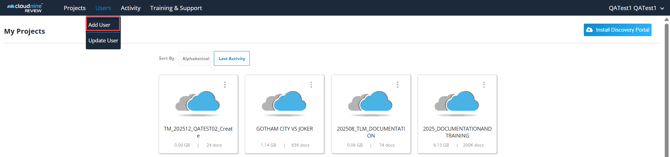
2. On the My Projects page, select **Users - Add Users** from the menu bar.
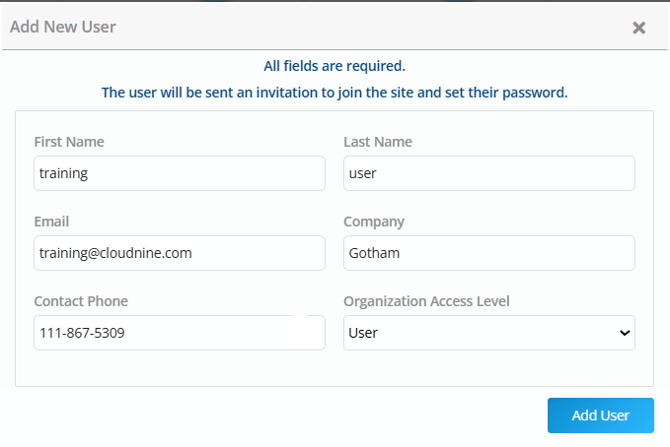
3. The **Add New User** screen appears. Type the First Name, Last Name, Email, Company,and Contact Phone number. Select the [Organization Access Level](https://kb.cloudnine.com/cloudnine-review-what-are?hsLang=en)from the drop-down list.
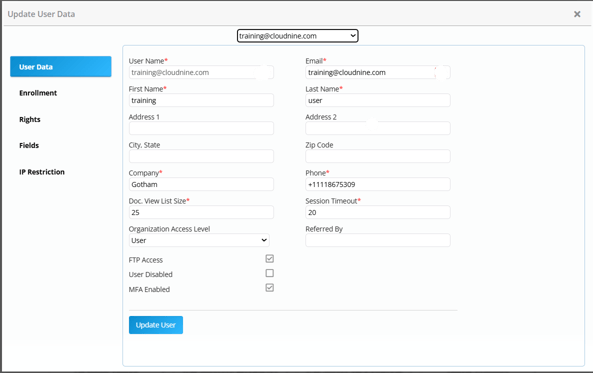
4. Click **Add User**. The User has been created, and you are now in the **Update User Data** window, where you can add additional User Data, enroll the user to specific projects (enrollment), assign project Rights, customize the fields the user sees, and specify IP Addresses.
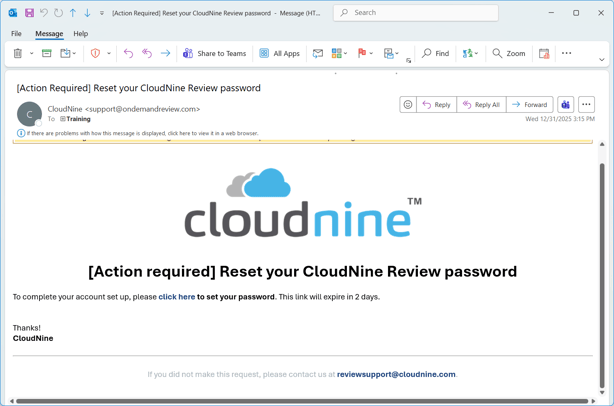
New users receive an Action Email prompting them to reset their CloudNine Review password. This is necessary for the user to access CloudNine Review projects to which they are enrolled.
- [CloudNine Training Videos](https://kb.cloudnine.com/cloudnine-training-videos?hsLang=en#main-content)
- [CloudNine Videos by Product](https://kb.cloudnine.com/cloudnine-training-videos?hsLang=en#cloudnine-videos-by-product)
- [CloudNine Review](https://kb.cloudnine.com/cloudnine-review?hsLang=en#main-content)
- [CloudNine Review Video Library](https://kb.cloudnine.com/cloudnine-review?hsLang=en#cloudnine-review-video-library)
- [Section 1: Getting Started](https://kb.cloudnine.com/cloudnine-review?hsLang=en#section-1-getting-started)
- [Getting Started: My Projects](https://kb.cloudnine.com/cloudnine-review?hsLang=en#getting-started-my-projects)
- [Section 2: Understanding Different Views](https://kb.cloudnine.com/cloudnine-review?hsLang=en#section-2-understanding-different-views)
- [Section 3: Searching](https://kb.cloudnine.com/cloudnine-review?hsLang=en#section-3-searching)
- [Section 3A. Smart Filters](https://kb.cloudnine.com/cloudnine-review?hsLang=en#section-3a-smart-filters)
- [3b: Search Term Lists](https://kb.cloudnine.com/cloudnine-review?hsLang=en#3b-search-term-lists)
- [Section 4: Working with Documents](https://kb.cloudnine.com/cloudnine-review?hsLang=en#section-4-working-with-documents)
- [Generating Images](https://kb.cloudnine.com/cloudnine-review?hsLang=en#generating-images)
- [Automated Redaction](https://kb.cloudnine.com/cloudnine-review?hsLang=en#automated-redaction)
- [Exporting/Producing](https://kb.cloudnine.com/cloudnine-review?hsLang=en#exporting-producing)
- [Section 5: Administrative Functions](https://kb.cloudnine.com/cloudnine-review?hsLang=en#section-5-administrative-functions)
- [Reporting](https://kb.cloudnine.com/cloudnine-review?hsLang=en#reporting)
- [Frequently Asked Questions and Issues](https://kb.cloudnine.com/cloudnine-review?hsLang=en#frequently-asked-questions-and-issues)
- [Cloud Connector](https://kb.cloudnine.com/cloudnine-review?hsLang=en#cloud-connector)
- [EULA](https://kb.cloudnine.com/cloudnine-review?hsLang=en#eula)
- [CloudNine Discovery Portal](https://kb.cloudnine.com/cloudnine-discovery-portal?hsLang=en#main-content)
- [CloudNine Discovery Portal Video Library](https://kb.cloudnine.com/cloudnine-discovery-portal?hsLang=en#cloudnine-discovery-portal-video-library)
- [Getting Started](https://kb.cloudnine.com/cloudnine-discovery-portal?hsLang=en#getting-started)
- [File System Workflows](https://kb.cloudnine.com/cloudnine-discovery-portal?hsLang=en#file-system-workflows)
- [Data Transfer Workflows](https://kb.cloudnine.com/cloudnine-discovery-portal?hsLang=en#data-transfer-workflows)
- [LAW Bridge](https://kb.cloudnine.com/cloudnine-discovery-portal?hsLang=en#law-bridge)
- [Global Monitoring Console](https://kb.cloudnine.com/cloudnine-discovery-portal?hsLang=en#global-monitoring-console)
- [Advanced Features & Troubleshooting](https://kb.cloudnine.com/cloudnine-discovery-portal?hsLang=en#advanced-features-troubleshooting)
- [LAW](https://kb.cloudnine.com/law?hsLang=en#main-content)
- [CloudNine LAW Video Library](https://kb.cloudnine.com/law?hsLang=en#cloudnine-law-video-library)
- [CloudNine LAW: Did You Know?](https://kb.cloudnine.com/law?hsLang=en#cloudnine-law-did-you-know)
- [Installation and Setup](https://kb.cloudnine.com/law?hsLang=en#installation-and-setup)
- [Print Queue Management](https://kb.cloudnine.com/law?hsLang=en#print-queue-management)
- [Turbo Import](https://kb.cloudnine.com/law?hsLang=en#turbo-import)
- [ED Loader](https://kb.cloudnine.com/law?hsLang=en#ed-loader)
- [Errors](https://kb.cloudnine.com/law?hsLang=en#errors)
- [Email](https://kb.cloudnine.com/law?hsLang=en#email)
- [Endorse](https://kb.cloudnine.com/law?hsLang=en#endorse)
- [Document Numbering](https://kb.cloudnine.com/law?hsLang=en#document-numbering)
- [Annotations](https://kb.cloudnine.com/law?hsLang=en#annotations)
- [Image Conversion](https://kb.cloudnine.com/law?hsLang=en#image-conversion)
- [Near Dupe](https://kb.cloudnine.com/law?hsLang=en#near-dupe)
- [SQL](https://kb.cloudnine.com/law?hsLang=en#sql)
- [Batch Printing HTML](https://kb.cloudnine.com/law?hsLang=en#batch-printing-html)
- [DataSent](https://kb.cloudnine.com/law?hsLang=en#datasent)
- [Filter and Search](https://kb.cloudnine.com/law?hsLang=en#filter-and-search)
- [Administration](https://kb.cloudnine.com/law?hsLang=en#administration)
- [Explore](https://kb.cloudnine.com/explore?hsLang=en#main-content)
- [CloudNine Explore Video Library](https://kb.cloudnine.com/explore?hsLang=en#cloudnine-explore-video-library)
- [Managing Cases](https://kb.cloudnine.com/explore?hsLang=en#managing-cases)
- [Importing](https://kb.cloudnine.com/explore?hsLang=en#importing)
- [Searching](https://kb.cloudnine.com/explore?hsLang=en#searching)
- [Exporting](https://kb.cloudnine.com/explore?hsLang=en#exporting)
- [Concordance](https://kb.cloudnine.com/concordance?hsLang=en#main-content)
- [Searching](https://kb.cloudnine.com/concordance?hsLang=en#searching)
- [eDocs](https://kb.cloudnine.com/concordance?hsLang=en#edocs)
- [Email](https://kb.cloudnine.com/concordance?hsLang=en#email)
- [Other](https://kb.cloudnine.com/concordance?hsLang=en#other)
- [Exporting](https://kb.cloudnine.com/concordance?hsLang=en#exporting)
- [Proof of Concept](https://kb.cloudnine.com/concordance?hsLang=en#proof-of-concept)
- [Concordance Desktop](https://kb.cloudnine.com/concordance-desktop?hsLang=en#main-content)
- [Email Database](https://kb.cloudnine.com/concordance-desktop?hsLang=en#email-database)
- [CloudNine Analyst](https://kb.cloudnine.com/cloudnine-analyst?hsLang=en#main-content)
- [CloudNine Analyst Video Library](https://kb.cloudnine.com/cloudnine-analyst?hsLang=en#cloudnine-analyst-video-library)
- [FAQ](https://kb.cloudnine.com/cloudnine-analyst?hsLang=en#faq)
- [Known Issues and Behavior](https://kb.cloudnine.com/cloudnine-analyst?hsLang=en#known-issues-and-behavior)
- [Account](https://kb.cloudnine.com/cloudnine-analyst?hsLang=en#account)
- [Projects](https://kb.cloudnine.com/cloudnine-analyst?hsLang=en#projects)
- [Import](https://kb.cloudnine.com/cloudnine-analyst?hsLang=en#import)
- [Export](https://kb.cloudnine.com/cloudnine-analyst?hsLang=en#export)
- [Machine Translation](https://kb.cloudnine.com/cloudnine-analyst?hsLang=en#machine-translation)
- [Reports](https://kb.cloudnine.com/cloudnine-analyst?hsLang=en#reports)
- [Investigations](https://kb.cloudnine.com/cloudnine-analyst?hsLang=en#investigations)
- [ESIA Desktop](https://kb.cloudnine.com/cloudnine-analyst?hsLang=en#esia-desktop)
- [ESIA Sync](https://kb.cloudnine.com/cloudnine-analyst?hsLang=en#esia-sync)
- [Administration](https://kb.cloudnine.com/cloudnine-analyst?hsLang=en#administration)
- [On Premise Software Q&A](https://kb.cloudnine.com/on-premise-software-qa?hsLang=en#main-content)
- [On Premise Software](https://kb.cloudnine.com/on-premise-software-qa?hsLang=en#on-premise-software)
- [EULA](https://kb.cloudnine.com/on-premise-software-qa?hsLang=en#eula)
[](http://www.cloudnine.com)
12848 Queensbury Lane, Suite 208 | Houston, TX 77024 | 713-999-4280 | [info@cloudnine.com](mailto:info@cloudnine.com)
Copyright © 2026, CloudNine