
To request deletion of an entire project or tagged records within a project, use Deletion Request in the Project Maintenance window. After you submit your request, CloudNine's Client Services team receives an email notification and provides the paperwork needed to complete the deletion request.
Before you Begin
You must be a Project Admin or Global Admin to access the form. If Deletion Request does not appear under Project Maintenance, you do not have the required permissions for that project.
1. Open Project Maintenance
In CloudNine Review, open Project Maintenance for the project you wish to submit a deletion request. Use any of these options:
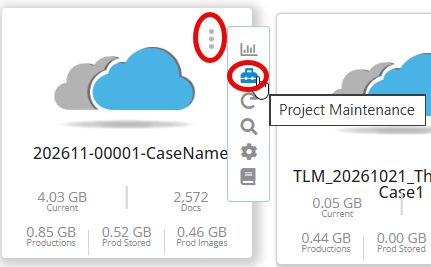
- On the My Projects page, select the Vertical ellipsis in the top-right corner of the Project Tile, then select Project Maintenance.
- Open the project, then select Projects - Maintenance.
- On My Projects, select Projects - Update - <Project Name>.
-
- Open the project, then select Projects - Maintenance.
- On the My Projects Page, select Projects - Update -<Project Name>.
2. Complete the Deletion Requst Form
In the Maintenance window, select the Deletion Request option. 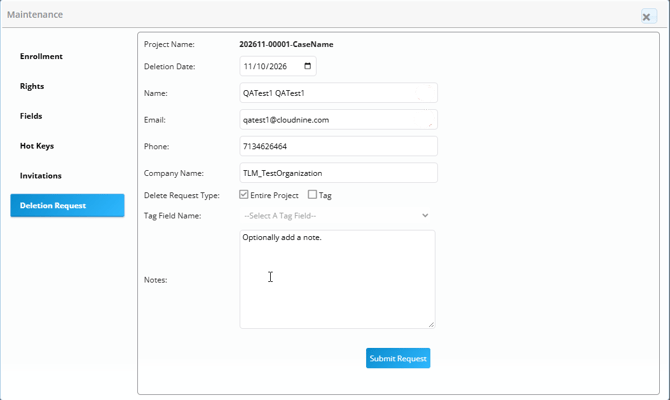
The form automatically fills in the Project Name, your user Name, Email, Phone, and Company Name. The project name displays only the first 50 chracters.
Complete these fields:
-
Deletion Date: Enter the date you wish the project or tagged records to be deleted.
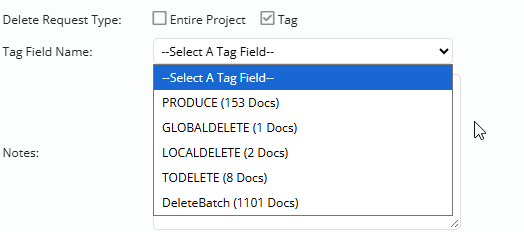
- Delete Request Type: Select Entire Project or Tag. If you select Tag, choose a tag field from the Select a Tag Field list. The number of tagged document records appears next to the tag field.
-
Note (optional): Add any details about your request, up to 510 characters.
3. Submit and Confirm your Request
-
Select Submit Request.
- Review the information in the Confirm message.
- Select OK to confirm the deletion request, or Cancel to cancel it.
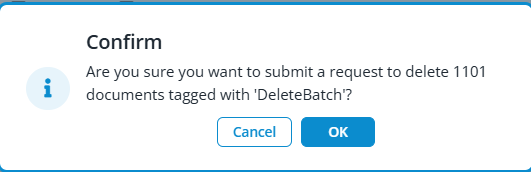
A Submitting Request message appears, indicating the request has been submitted.
What Happens Next
CloudNine's Client Services team reviews your request and provides the paperwork needed to complete it. Submitting the form starts the request process; it does not complete the deletion.