---
title: Adding Sources to an Import Session
description: "Explore: Adding Sources for import"
---
[Skip to content](https://kb.cloudnine.com/adding-sources-to-an-import-session#main-content)
English
Show submenu for translations
[Contact us](https://kb.cloudnine.com/kb-tickets/new?hsLang=en)

Open main navigation
Close main navigation
- English
Show submenu for translations
- [Contact us](https://kb.cloudnine.com/kb-tickets/new)
- [Go to cloudnine.com](https://cloudnine.com/)
[Go to cloudnine.com](https://cloudnine.com/)
Hello. How can we help you?
- There are no suggestions because the search field is empty.
1. [Help Center](https://kb.cloudnine.com/?hsLang=en)
2. [Explore](https://kb.cloudnine.com/explore?hsLang=en)
3. [Importing](https://kb.cloudnine.com/explore?hsLang=en#importing)
# Adding Sources to an Import Session
1. From the **Case Manager** tab, double-click on the desired **Case** to open it, and then navigate to **Import** sub-tab.
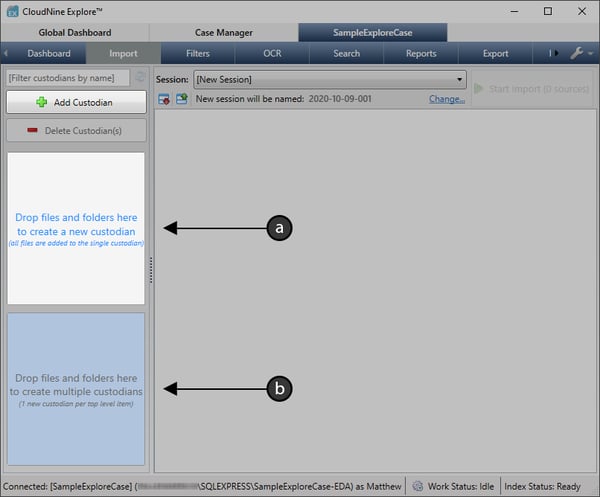
2. Using a Windows File Explorer, drag and drop the desired source files/folders onto one of the two available panes on the left:
1. Use the **Top** pane to create a **Single Custodian** for all sources.
2. Use the **Bottom** pane to create **Multiple Custodians**, one for each top-level source.
3. You can also use the  button at the top-left to create **Blank Custodians** instead.
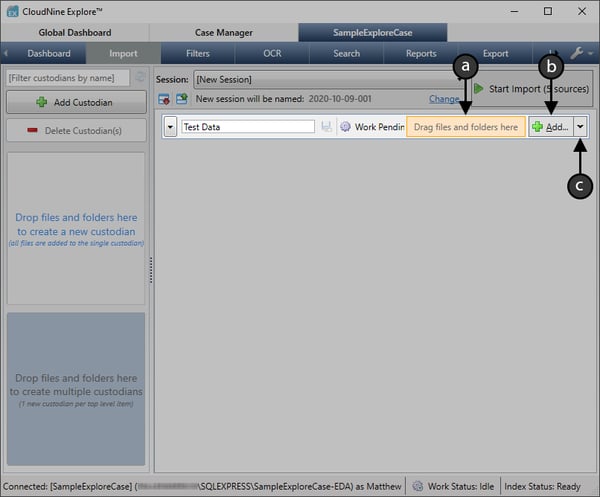
4. Once at least one **Custodian** has been created, you can add sources directly into any custodian in the following ways:
1. From any File Explorer, drag and drop the desired source files/folders onto the  target area.
2. Click the  button to open the **Browse For Folder** window, which will help you navigate to and select individual source folders to add.
3. Click the  button and select **Add Files...** from the drop-down to open a File Explorer, which will help you navigate to and select source files/folders to add.
5. When you're finished adding sources, you'll be ready to take the following actions as desired:
1. [**Remove Sources from the Import Session**](https://kb.cloudnine.com/removing-sources-from-an-import-session?hsLang=en)
2. [**Change the Import Session Label/Name**](https://kb.cloudnine.com/changing-the-import-session-label/name?hsLang=en)
3. Click **Start Import** at the top-right to begin importing any uncommitted sources.
| 💡 | Once the import has started, all sources will become permanently committed to their respective custodians. |
| --- | --- |
- [CloudNine Training Videos](https://kb.cloudnine.com/cloudnine-training-videos?hsLang=en#main-content)
- [CloudNine Videos by Product](https://kb.cloudnine.com/cloudnine-training-videos?hsLang=en#cloudnine-videos-by-product)
- [CloudNine Review](https://kb.cloudnine.com/cloudnine-review?hsLang=en#main-content)
- [CloudNine Review Video Library](https://kb.cloudnine.com/cloudnine-review?hsLang=en#cloudnine-review-video-library)
- [Section 1: Getting Started](https://kb.cloudnine.com/cloudnine-review?hsLang=en#section-1-getting-started)
- [Getting Started: My Projects](https://kb.cloudnine.com/cloudnine-review?hsLang=en#getting-started-my-projects)
- [Section 2: Understanding Different Views](https://kb.cloudnine.com/cloudnine-review?hsLang=en#section-2-understanding-different-views)
- [Section 3: Searching](https://kb.cloudnine.com/cloudnine-review?hsLang=en#section-3-searching)
- [Section 3A. Smart Filters](https://kb.cloudnine.com/cloudnine-review?hsLang=en#section-3a-smart-filters)
- [3b: Search Term Lists](https://kb.cloudnine.com/cloudnine-review?hsLang=en#3b-search-term-lists)
- [Section 4: Working with Documents](https://kb.cloudnine.com/cloudnine-review?hsLang=en#section-4-working-with-documents)
- [Generating Images](https://kb.cloudnine.com/cloudnine-review?hsLang=en#generating-images)
- [Automated Redaction](https://kb.cloudnine.com/cloudnine-review?hsLang=en#automated-redaction)
- [Exporting/Producing](https://kb.cloudnine.com/cloudnine-review?hsLang=en#exporting-producing)
- [Section 5: Administrative Functions](https://kb.cloudnine.com/cloudnine-review?hsLang=en#section-5-administrative-functions)
- [Reporting](https://kb.cloudnine.com/cloudnine-review?hsLang=en#reporting)
- [Frequently Asked Questions and Issues](https://kb.cloudnine.com/cloudnine-review?hsLang=en#frequently-asked-questions-and-issues)
- [Cloud Connector](https://kb.cloudnine.com/cloudnine-review?hsLang=en#cloud-connector)
- [EULA](https://kb.cloudnine.com/cloudnine-review?hsLang=en#eula)
- [CloudNine Discovery Portal](https://kb.cloudnine.com/cloudnine-discovery-portal?hsLang=en#main-content)
- [CloudNine Discovery Portal Video Library](https://kb.cloudnine.com/cloudnine-discovery-portal?hsLang=en#cloudnine-discovery-portal-video-library)
- [Getting Started](https://kb.cloudnine.com/cloudnine-discovery-portal?hsLang=en#getting-started)
- [File System Workflows](https://kb.cloudnine.com/cloudnine-discovery-portal?hsLang=en#file-system-workflows)
- [Data Transfer Workflows](https://kb.cloudnine.com/cloudnine-discovery-portal?hsLang=en#data-transfer-workflows)
- [LAW Bridge](https://kb.cloudnine.com/cloudnine-discovery-portal?hsLang=en#law-bridge)
- [Global Monitoring Console](https://kb.cloudnine.com/cloudnine-discovery-portal?hsLang=en#global-monitoring-console)
- [Advanced Features & Troubleshooting](https://kb.cloudnine.com/cloudnine-discovery-portal?hsLang=en#advanced-features-troubleshooting)
- [LAW](https://kb.cloudnine.com/law?hsLang=en#main-content)
- [CloudNine LAW Video Library](https://kb.cloudnine.com/law?hsLang=en#cloudnine-law-video-library)
- [CloudNine LAW: Did You Know?](https://kb.cloudnine.com/law?hsLang=en#cloudnine-law-did-you-know)
- [Installation and Setup](https://kb.cloudnine.com/law?hsLang=en#installation-and-setup)
- [Print Queue Management](https://kb.cloudnine.com/law?hsLang=en#print-queue-management)
- [Turbo Import](https://kb.cloudnine.com/law?hsLang=en#turbo-import)
- [ED Loader](https://kb.cloudnine.com/law?hsLang=en#ed-loader)
- [Errors](https://kb.cloudnine.com/law?hsLang=en#errors)
- [Email](https://kb.cloudnine.com/law?hsLang=en#email)
- [Endorse](https://kb.cloudnine.com/law?hsLang=en#endorse)
- [Document Numbering](https://kb.cloudnine.com/law?hsLang=en#document-numbering)
- [Annotations](https://kb.cloudnine.com/law?hsLang=en#annotations)
- [Image Conversion](https://kb.cloudnine.com/law?hsLang=en#image-conversion)
- [Near Dupe](https://kb.cloudnine.com/law?hsLang=en#near-dupe)
- [SQL](https://kb.cloudnine.com/law?hsLang=en#sql)
- [Batch Printing HTML](https://kb.cloudnine.com/law?hsLang=en#batch-printing-html)
- [DataSent](https://kb.cloudnine.com/law?hsLang=en#datasent)
- [Filter and Search](https://kb.cloudnine.com/law?hsLang=en#filter-and-search)
- [Administration](https://kb.cloudnine.com/law?hsLang=en#administration)
- [Explore](https://kb.cloudnine.com/explore?hsLang=en#main-content)
- [CloudNine Explore Video Library](https://kb.cloudnine.com/explore?hsLang=en#cloudnine-explore-video-library)
- [Managing Cases](https://kb.cloudnine.com/explore?hsLang=en#managing-cases)
- [Importing](https://kb.cloudnine.com/explore?hsLang=en#importing)
- [Searching](https://kb.cloudnine.com/explore?hsLang=en#searching)
- [Exporting](https://kb.cloudnine.com/explore?hsLang=en#exporting)
- [Concordance](https://kb.cloudnine.com/concordance?hsLang=en#main-content)
- [Searching](https://kb.cloudnine.com/concordance?hsLang=en#searching)
- [eDocs](https://kb.cloudnine.com/concordance?hsLang=en#edocs)
- [Email](https://kb.cloudnine.com/concordance?hsLang=en#email)
- [Other](https://kb.cloudnine.com/concordance?hsLang=en#other)
- [Exporting](https://kb.cloudnine.com/concordance?hsLang=en#exporting)
- [Proof of Concept](https://kb.cloudnine.com/concordance?hsLang=en#proof-of-concept)
- [Concordance Desktop](https://kb.cloudnine.com/concordance-desktop?hsLang=en#main-content)
- [Email Database](https://kb.cloudnine.com/concordance-desktop?hsLang=en#email-database)
- [CloudNine Analyst](https://kb.cloudnine.com/cloudnine-analyst?hsLang=en#main-content)
- [CloudNine Analyst Video Library](https://kb.cloudnine.com/cloudnine-analyst?hsLang=en#cloudnine-analyst-video-library)
- [FAQ](https://kb.cloudnine.com/cloudnine-analyst?hsLang=en#faq)
- [Known Issues and Behavior](https://kb.cloudnine.com/cloudnine-analyst?hsLang=en#known-issues-and-behavior)
- [Account](https://kb.cloudnine.com/cloudnine-analyst?hsLang=en#account)
- [Projects](https://kb.cloudnine.com/cloudnine-analyst?hsLang=en#projects)
- [Import](https://kb.cloudnine.com/cloudnine-analyst?hsLang=en#import)
- [Export](https://kb.cloudnine.com/cloudnine-analyst?hsLang=en#export)
- [Machine Translation](https://kb.cloudnine.com/cloudnine-analyst?hsLang=en#machine-translation)
- [Reports](https://kb.cloudnine.com/cloudnine-analyst?hsLang=en#reports)
- [Investigations](https://kb.cloudnine.com/cloudnine-analyst?hsLang=en#investigations)
- [ESIA Desktop](https://kb.cloudnine.com/cloudnine-analyst?hsLang=en#esia-desktop)
- [ESIA Sync](https://kb.cloudnine.com/cloudnine-analyst?hsLang=en#esia-sync)
- [Administration](https://kb.cloudnine.com/cloudnine-analyst?hsLang=en#administration)
- [On Premise Software Q&A](https://kb.cloudnine.com/on-premise-software-qa?hsLang=en#main-content)
- [On Premise Software](https://kb.cloudnine.com/on-premise-software-qa?hsLang=en#on-premise-software)
- [EULA](https://kb.cloudnine.com/on-premise-software-qa?hsLang=en#eula)
[](http://www.cloudnine.com)
12848 Queensbury Lane, Suite 208 | Houston, TX 77024 | 713-999-4280 | [info@cloudnine.com](mailto:info@cloudnine.com)
Copyright © 2026, CloudNine